
For agencies and consultants
Audit tools for marketing agencies
Find it before your client does
Then prove which fixes landed, for every client
Check every client’s marketing stack from public evidence and turn what you find into assigned work. One workspace per client, one Portfolio across all of them.
Whether your agency sells audits or not yet
Yellowhead Digital gathers the evidence. The client relationship, the interpretation and the work that follows stay with your agency.
You already sell audits
- Senior hours go on working out what is installed and what is broken before any of the thinking starts.
- On a fixed fee, every hour over the estimate comes out of the margin.
- Two people audit the same site and hand back different reports.
- A slow turnaround gives the prospect time to sign with someone else.
Take the evidence gathering off your senior people
The Diagnostic reads a business’s public evidence across ten pillars in 5–10 minutes, with the same checks whoever on your team runs it. Your senior people start from findings and spend their hours on interpretation, the inside view and the work you sell after the audit.
Price your client audits, and protect the margin →You don’t sell audits yet
- Prospects have no reason to take the first meeting.
- You cannot show what you would fix before you ask for a retainer.
- Another agency audits your client and walks in with findings of its own.
- An audit practice means hiring people you cannot yet keep busy.
Add an audit offer without hiring for it
Run the Diagnostic on a prospect or a client and put your own read and proposal on top. Add the scans the findings call for, and book our team when a job needs people. Every Agency plan pays the partner rate, 20% below rate card, on the Citation, Crawlability and Accessibility Scans and their re-scans. Your agency leads the audit, with our software behind it: the report carries the Yellowhead Digital name, and the recommendations, the scope and the client relationship are yours.
Start selling audit services without hiring →Baseline, detect, assign, verify, prove: five steps for every client
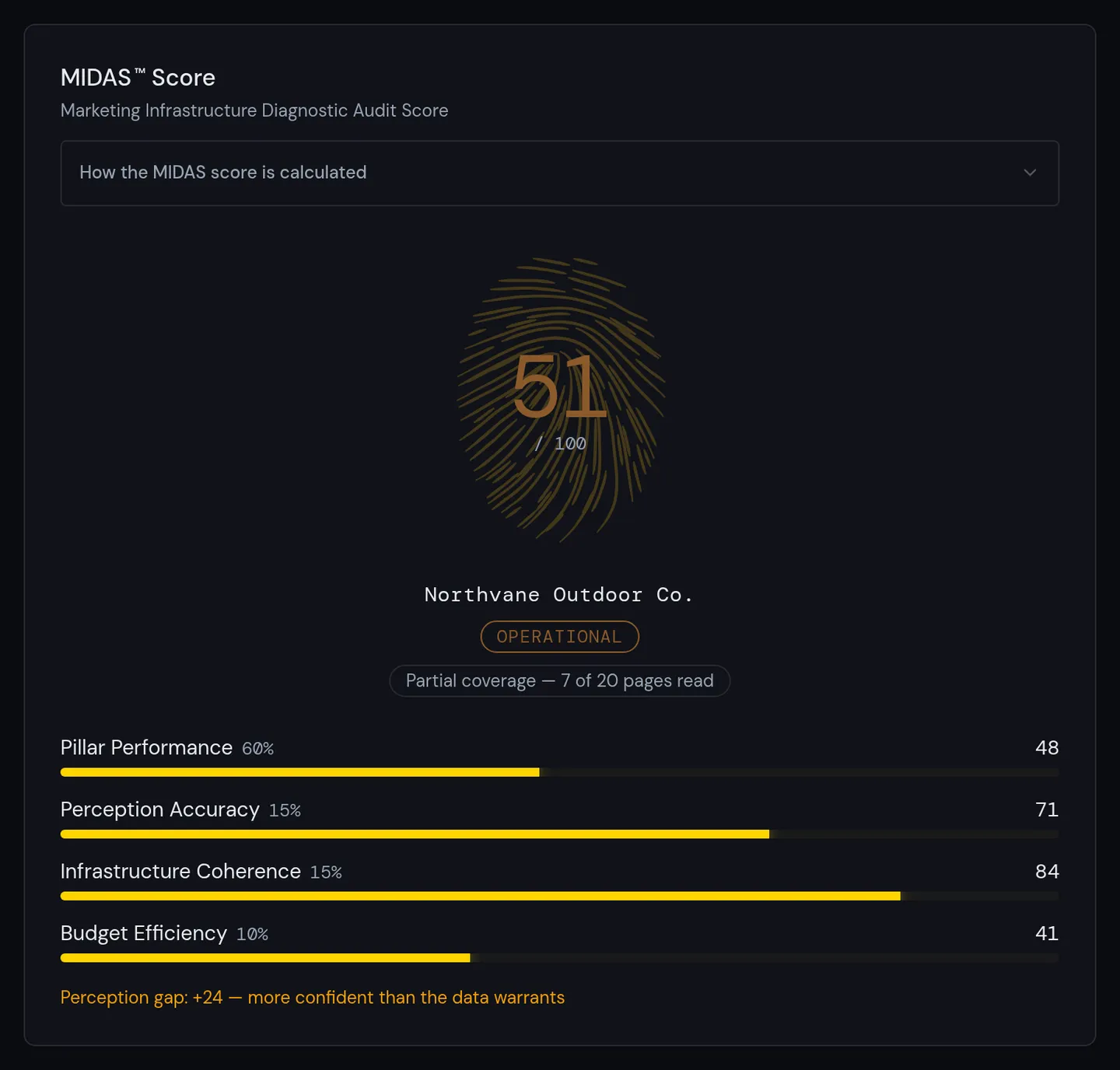
The same five steps for every client, in one place. The first one runs on a MIDAS™ score, our 0–100 read of the whole marketing stack.
- 01
Baseline
Run a Diagnostic when a client signs. In 5–10 minutes it scores ten pillars from public evidence and gives you a dated starting point that every later check is measured against.
- 02
Detect
Put each client on a monthly or quarterly Diagnostic. After each run you get a score-change alert or a summary, and every Monday the agency’s owners and admins get one email of what changed across the book.
- 03
Assign
Every finding arrives as an action item with a priority. Assign it to someone on your team and give it a due date.
- 04
Verify
Your team marks the work complete, a second person confirms it, and the next Diagnostic re-checks what can be seen from outside. Only that re-check can mark an item Verified.
- 05
Prove
The progress report shows one client over any period: what was wrong, what was done, what changed and what is still open.
The agency owner buys the Yellowhead platform. The account team uses it every week
For the agency owner
- One view of every client, ranked by MIDAS score, by change since the last Diagnostic, or by open action items.
- One method across the agency, so the read on a client does not depend on who runs the account or reset when it changes hands.
- Evidence for the retainer conversation: what was fixed, who confirmed it, and what Yellowhead verified.
For the people running the accounts
- Account directors
- A client’s status before the call, and a progress report instead of a deck assembled the night before.
- Performance leads
- The tags, conversion measurement and consent that the media spend depends on, checked before you scale it.
- Search engine optimisation (SEO) leads
- Whether AI crawlers are let in, whether structured data is there, and how often AI answers cite the client.
Client workspaces and the Portfolio
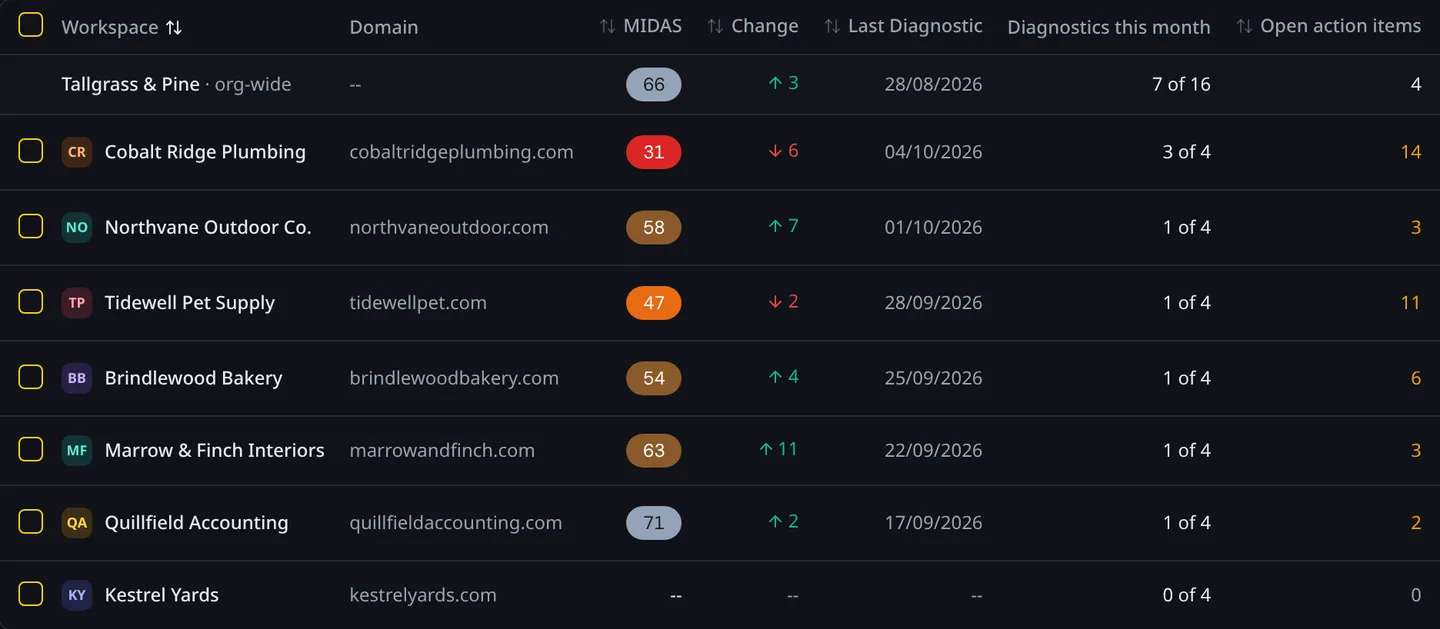
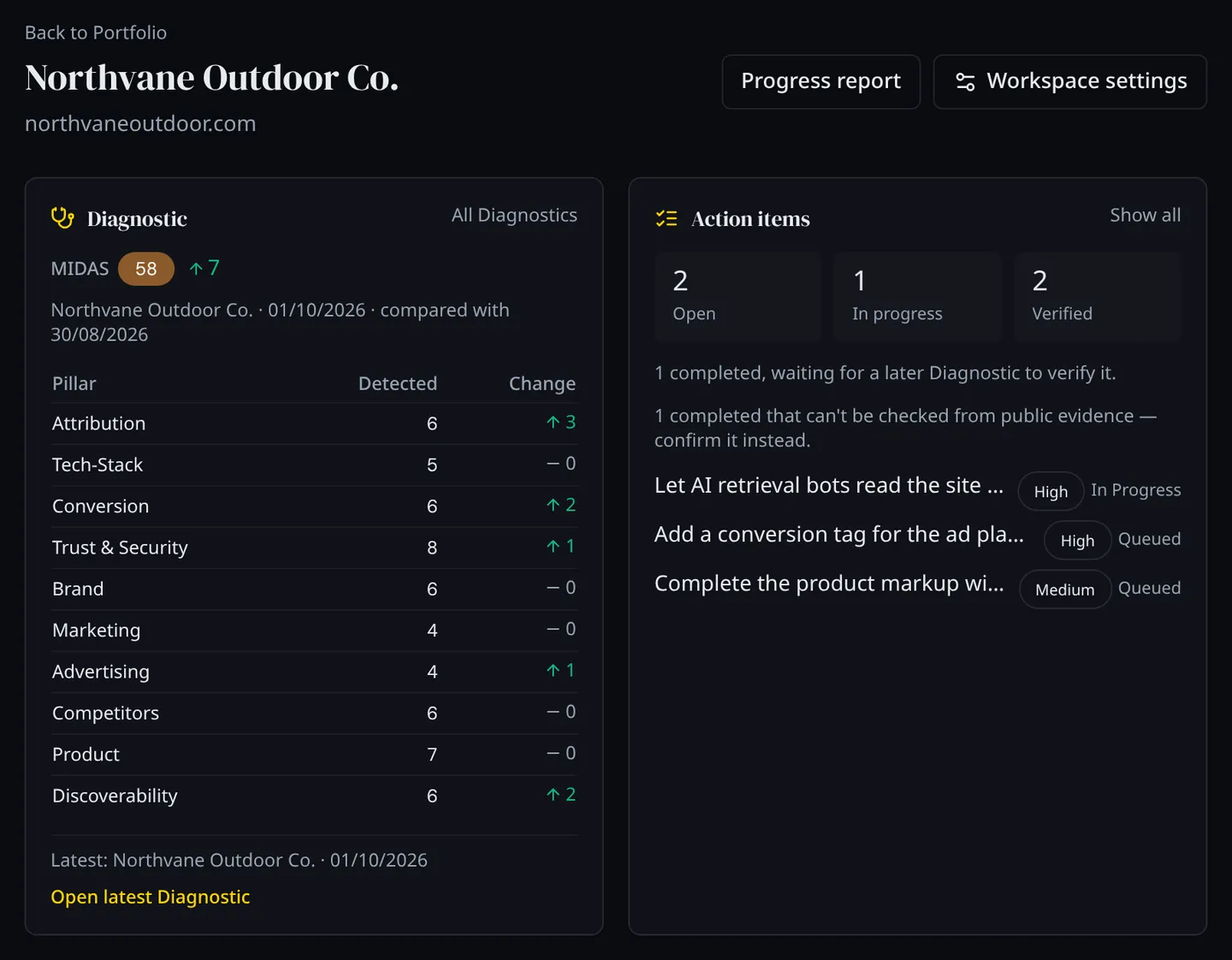
Each client gets a workspace. The Portfolio puts them in one table, so the client that needs attention this week is at the top, not buried in a folder.
Client workspaces
One per client, each with its own Diagnostics, action items, schedule and history. Agency plans include 25, 100 or 250.
Portfolio
Sort every workspace by MIDAS score, change, last Diagnostic, open action items, next scheduled Diagnostic or pipeline stage, and filter by MIDAS band or stage. Set Diagnostic caps and schedules for many workspaces at once.
Client viewers
Invite clients to read the work you deliver to them, under their own login. They can confirm completed work and attach evidence.
Weekly digest
Every Monday, owners and admins get one email listing score moves, deliveries and workspaces close to their monthly cap.
Pipeline board
Move each client through your own stages, with triggers and templates for the steps you repeat.
Fulfillment queue
Every Yellowhead service you have booked, across all clients, by status: booked, assigned, in progress, delivered.
Agency billing
Your subscription, Diagnostic usage and Yellowhead service charges, grouped by client.
Client plans
Clients who want to run Diagnostics themselves can add their own Business plan to their workspace.
Connect Claude or ChatGPT and ask which clients moved, what is still open on a client’s latest report, or have it start a Diagnostic of a prospect. AI connectors →
Completed, Confirmed, Verified: how far each fix has been checked
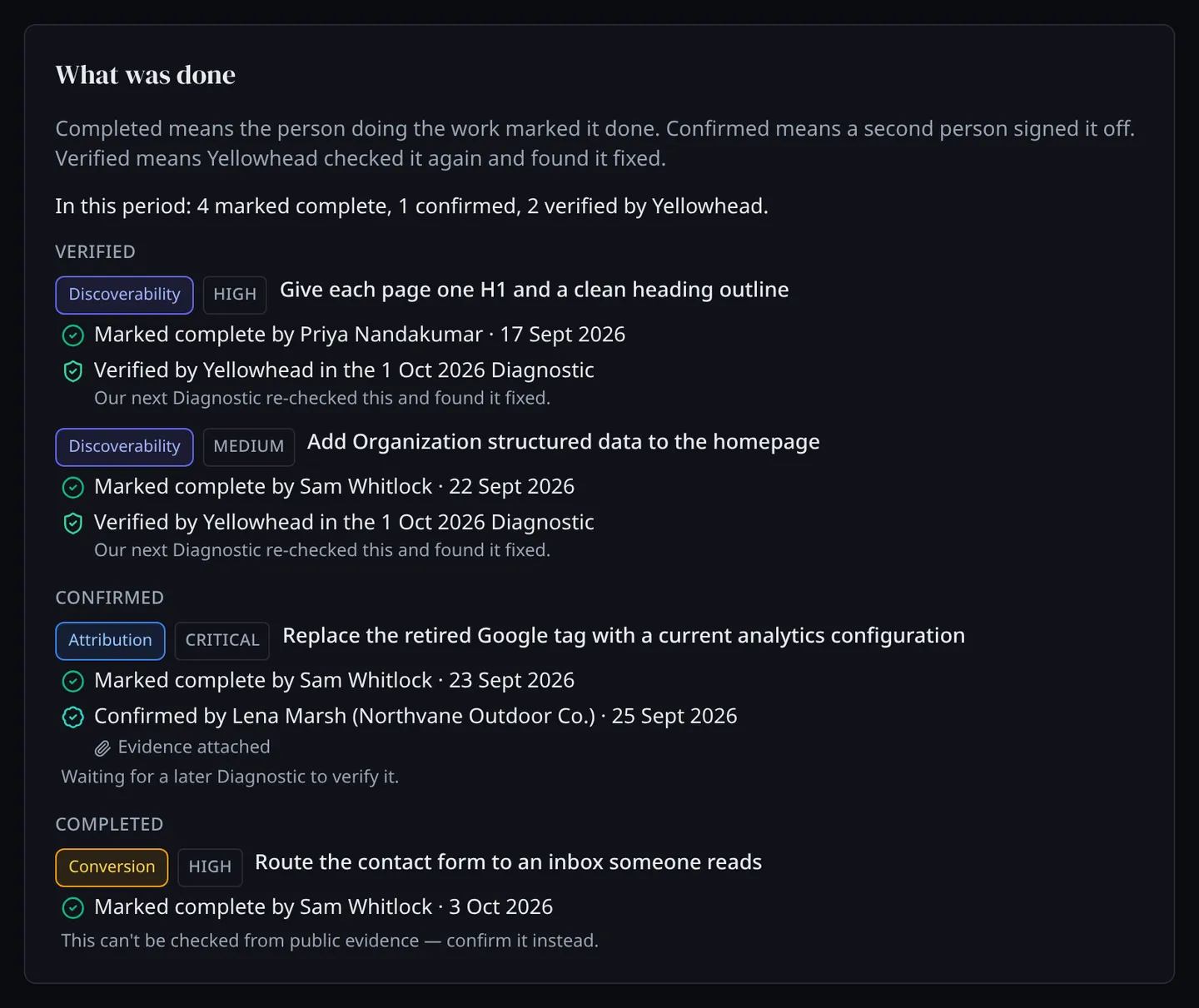
“We fixed it” is a claim. Each action item shows how far its fix has been checked, and who stands behind each step.
- Completed
- The person who did the work marked it done. Their name and the date are recorded.
- Confirmed
- A second person signed it off: a lead at your agency, or the client under their own login. Evidence can be attached.
- Verified
- Yellowhead’s next Diagnostic re-checked the finding from outside and found it fixed. Nobody can set this by hand.
Fixes the next Diagnostic can verify
Not everything the Diagnostic checks: these are the findings a later Diagnostic can re-check from outside and mark Verified on its own.
- A missing or monitor-only Domain-based Message Authentication, Reporting and Conformance (DMARC) policy, and a Sender Policy Framework (SPF) record that does not enforce: the two records that stop others sending email as the client’s domain
- Missing structured data, and missing Organization markup
- A missing cookie banner or privacy policy
- No agent manifest, the file that tells AI agents what the business does
- A broken heading outline
- No ad platform pixels, conversion measurement that runs only in the browser, and no Consent Mode
- On the audited page: broken internal links, insecure http:// files loaded on a secure page, and a missing canonical tag; and an http:// address that does not redirect to https://
- A Model Context Protocol (MCP) Registry listing under the client’s domain whose server sits on another domain that the site’s own MCP files do not name, and an MCP server card that disagrees with the site’s MCP manifest
Fixes that leave no public trace say so on the item, and stop at Confirmed. A score going up is never treated as proof that a fix landed.
A progress report for every client
Pick a client and a period. The report is built from the Diagnostics, scans and action items already in the workspace: what was in the period, what was wrong, what was done, what changed, what is still open, and how the client’s AI citations moved against competitors.
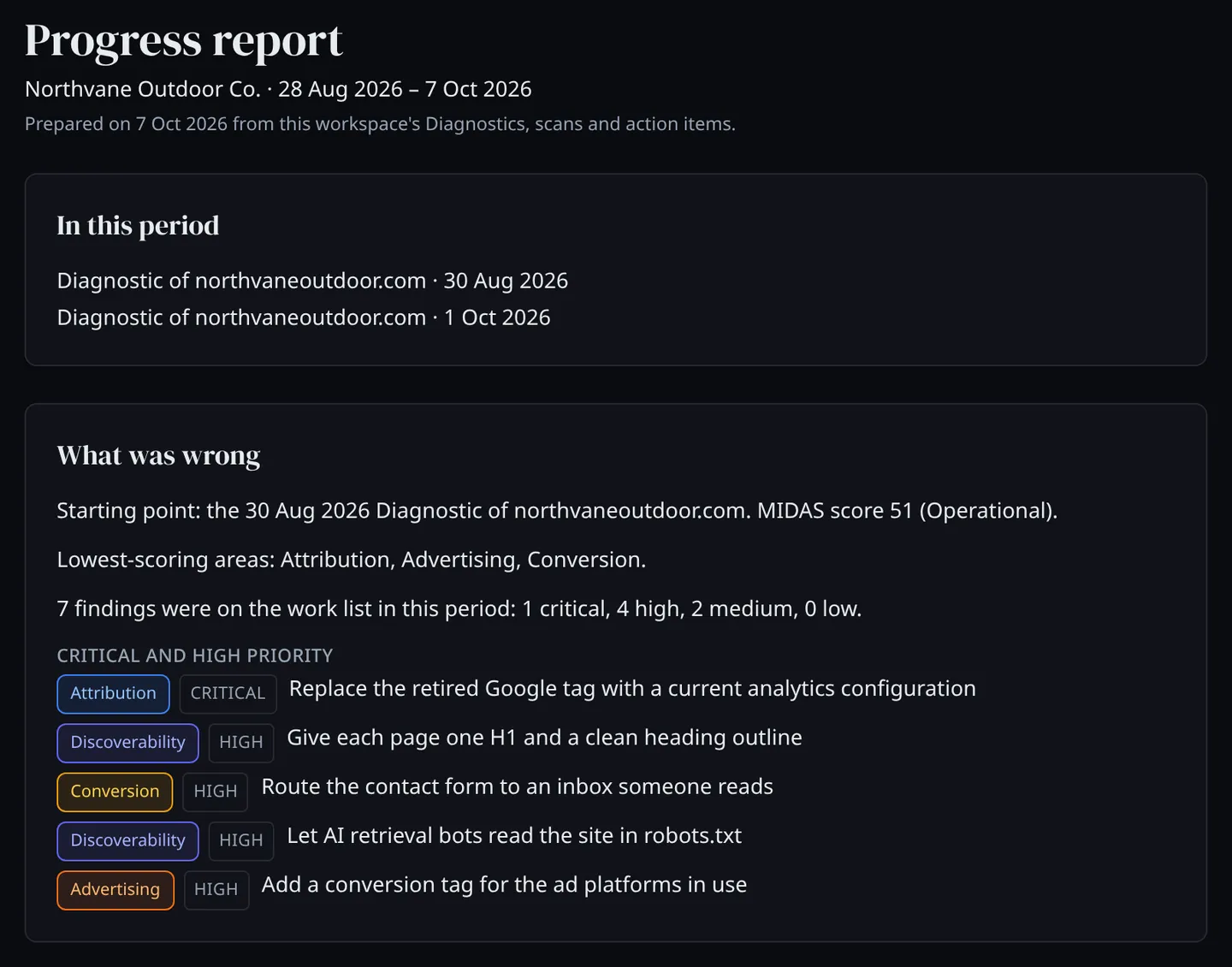
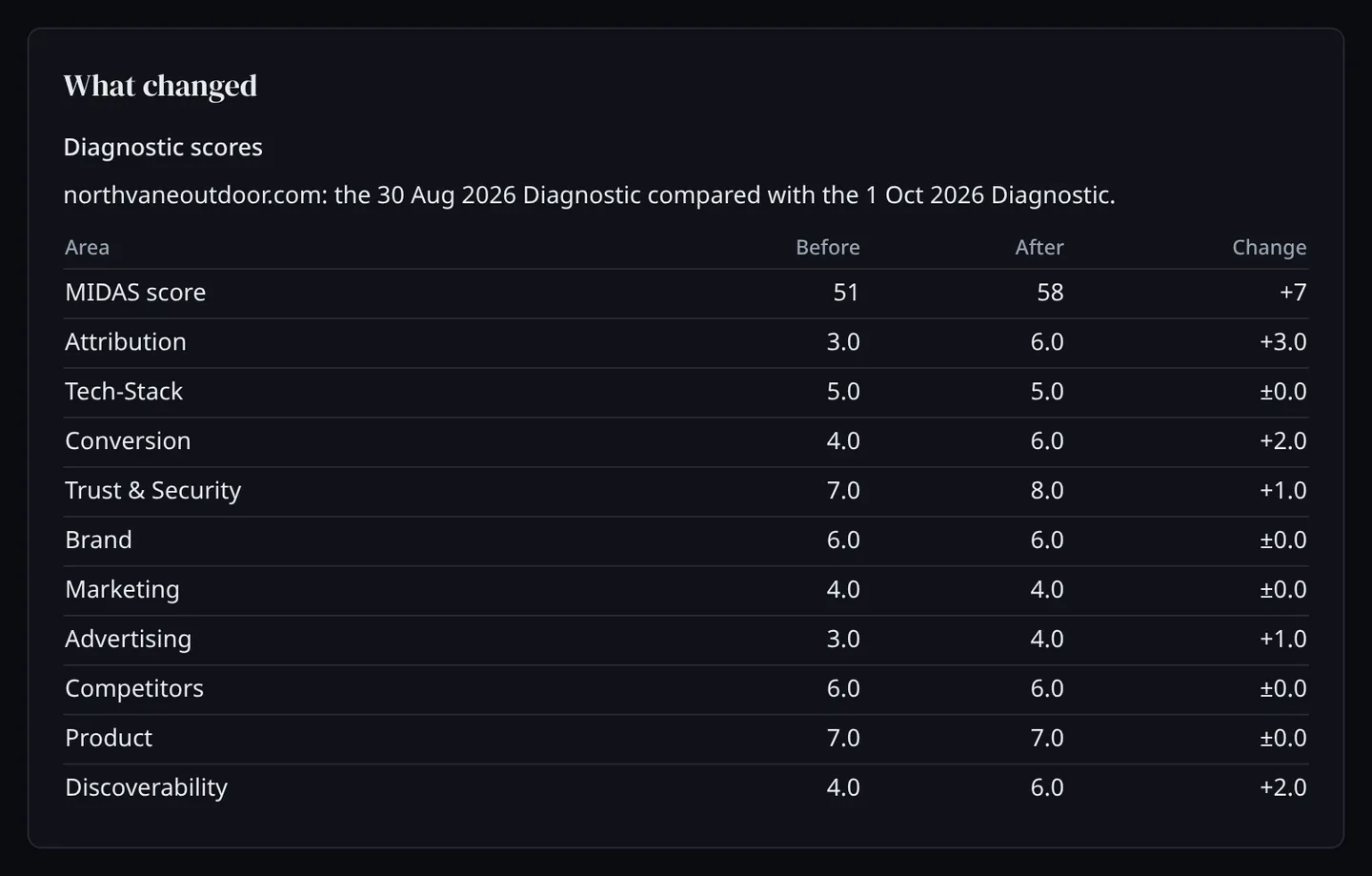
Your client can open it under their own login. For anyone else, print it or save it as a PDF. The client review playbook →
Use audits in your proposals
A Diagnostic works on any business with a public website, so you can run one on a prospect before the first call, walk in with something specific, and build the proposal on its findings. If they want the evidence, share the report as a link or a PDF; it carries a notice that it was prepared for your agency alone. Outreach Rehearsal lets you practise the first message against a simulated buyer before you send it from your own tools.
Yellowhead never sends outreach for you and supplies no lead lists: you bring the prospects. The prospect outreach playbook →
Agency playbooks
How agencies put this to work, step by step. Every step uses something that works today.
Turn prospect research into better outreach
Run a Diagnostic on a prospect before the first call, pick the one finding that matters to them, and rehearse the approach before you send anything.
Read the playbook →Audit a new client before you start
Open a workspace for the client, run the Diagnostic, and add the specialist reads the findings call for. Everything lands in that client’s workspace as one baseline.
Read the playbook →Start selling audit services without hiring
Sell an audit your agency leads, with the Diagnostic as its backbone. Yellowhead Digital gathers the evidence, your agency interprets it and proposes the work, and our team covers the parts that need people.
Read the playbook →Price your client audits, and protect the margin
Set the price of a client audit from the work your people still do once the Diagnostic has gathered the outside-in evidence, and productize the scope so every audit is sold and delivered the same way.
Read the playbook →Check a client is ready for paid media
Before you scale spend, check the measurement underneath it: which tags load, whether conversions are measured, and whether consent is in place.
Read the playbook →Track AI search visibility over time
Measure how often AI answers cite your client against named competitors, then re-scan after changes and compare like for like.
Read the playbook →Track AI crawlability over time
Take a reading of which pages AI crawlers can reach, then re-scan the same pages after a change or a fix and compare the two runs page by page.
Read the playbook →Prepare for a client review
Pull what was wrong, what was done, what changed and what is still open for one client over any period, from the work already in their workspace.
Read the playbook →Find new work in existing accounts
Put every client on a scheduled Diagnostic and let what changes between runs show you where the next piece of work is.
Read the playbook →Verify that a marketing problem was fixed
Mark the work done, have a second person confirm it, and let the next Diagnostic check it independently.
Read the playbook →Build a complete baseline for a new client
The full version of the new-client audit: the Diagnostic, every specialist read, a strategy session and a hands-on audit, ending in one prioritised roadmap.
Read the playbook →Cover a client that runs several markets or brands
Give each of the client’s country sites or brands its own workspace, run a Diagnostic of each one, see them ranked side by side in the Portfolio, and give each country team its own view of its own market.
Read the playbook →Auditing by hand, or showing a client what an audit covers? The marketing audit guide and checklist →
Agency plans
Every Agency plan has the same features. They differ in how many clients and Diagnostics they cover.
Consultant
$199 USD / month
For consultants and fractional marketing leads looking after a handful of clients.
- Up to 25 client workspaces
- 8 Diagnostics a month
- 3 Outreach Rehearsal sessions a month
Studio
$499 USD / month
For agencies with a growing client book.
- Up to 100 client workspaces
- 16 Diagnostics a month
- 10 Outreach Rehearsal sessions a month
Firm
$999 USD / month
For agencies managing client portfolios at scale.
- Up to 250 client workspaces
- 32 Diagnostics a month
- 15 Outreach Rehearsal sessions a month
Need more Diagnostics in a month? Additional Diagnostics are $49 USD each. Full plan details →
Monitoring is a monthly add-on for each client workspace: a re-check that doesn't use your plan's Diagnostics, alerts when a pillar score moves, and one included Citation Scan Watch. How Monitoring works →
Every Agency plan is in the Yellowhead Partner Program and pays the partner rate, 20% below rate card, on the Citation Scan and its re-scan, the Crawlability Scan and its re-scan, the Accessibility Scan and its re-scan, and a Competitive Report ordered for a client workspace. Strategic Assessments, Course Corrections, Infrastructure Audits, Blueprints, Architect Operations and Assist are charged at rate card, as is the Citation Scan Watch.
Working on your own? For consultants and fractional leads →
What a Yellowhead Diagnostic does not do
- It reads public evidence only. It does not log in to your clients’ ad accounts, analytics or customer databases.
- It sees that a tag is present, not that it fires correctly.
- It sends nothing to your clients or prospects. You decide what to share, and when.
- It does not carry your agency’s name: reports carry the Yellowhead Digital name.
What sits behind a login is the Infrastructure Audit’s job: our team reviews those systems hands-on, with read-only access you grant. About the Infrastructure Audit →
Frequently asked questions from agencies
We already sell audits. Why would we add a Yellowhead Diagnostic?
To take the evidence gathering off your senior people. The Diagnostic reads a business’s public evidence across ten pillars in five to ten minutes, with the same checks whoever runs it, so every audit starts from the same method. Your team’s hours go to what the client pays for: what the findings mean, the inside view, and the work you propose next.
We don’t sell audits. Can we start without hiring?
Yes. Run the Diagnostic on a prospect or a client, add the scans the findings call for, and put your own read and proposal on top. When a job needs people, our team’s Strategic Assessment and Infrastructure Audit are there to book.
Does it replace an SEO audit tool?
No. It does a different job. An SEO audit tool goes through a site page by page for search problems. The Diagnostic reads a business’s public evidence across ten pillars, from tracking and consent to advertising and competitors, and compares it with your own rating of each pillar. Search is one part of one pillar, Discoverability. Keep your SEO tool for the page-by-page work, and use the Diagnostic for the whole marketing stack.
Can we charge our clients for an audit built on a Yellowhead Diagnostic?
Yes. Under our Terms you can charge your clients for your own services, including delivering a Yellowhead report you are allowed to share with them. You may not present the report as your own methodology, and any notice it carries stays on it.
Whose name is on the report?
Yellowhead Digital’s, with no agency branding on the report or in the client’s view, so you can tell your clients you work with Yellowhead Digital. Your agency leads the audit, with our software behind it, and the recommendations, the scope and the client relationship are your agency’s.
What is the partner rate?
Every Agency plan is in the Yellowhead Partner Program and pays the partner rate, 20% below rate card, on the Citation Scan and its re-scan, the Crawlability Scan and its re-scan, the Accessibility Scan and its re-scan, and a Competitive Report ordered for a client workspace. Strategic Assessments, Course Corrections, Infrastructure Audits, Blueprints, Architect Operations and Assist are charged at rate card, as is the Citation Scan Watch.
Can we run a Diagnostic on a prospect?
Yes. A Diagnostic works on any business with a public website and needs nothing from them. If the prospect wants the evidence, share the report as a link or a PDF; it carries a notice that it was prepared for your agency alone. We never send outreach for you and supply no lead lists.
What do the Agency plans cost?
Consultant $199, Studio $499 and Firm $999 per month, in USD. They have the same features and differ in how many client workspaces, Diagnostics and Outreach Rehearsal sessions they include. Additional Diagnostics are $49 USD each. You can start with a free Diagnostic.
Start with a free Diagnostic on one client
Run a free Diagnostic on a client’s site. When you want the rest, an Agency plan gives every client a workspace.